<?xml version="1.0" encoding="utf-8"?><feed xmlns="http://www.w3.org/2005/Atom" ><generator uri="https://jekyllrb.com/" version="4.4.1">Jekyll</generator><link href="https://blog.wagemakers.be/atom.xml" rel="self" type="application/atom+xml" /><link href="https://blog.wagemakers.be/" rel="alternate" type="text/html" /><updated>2026-01-26T20:10:56+01:00</updated><id>https://blog.wagemakers.be/atom.xml</id><title type="html">stafwag Blog</title><subtitle>Hi, I&apos;m staf.</subtitle><author><name>Staf Wagemakers</name></author><entry><title type="html">Moved my blog to [blog.wagemakers.be](https://blog.wagemakers.be)</title><link href="https://blog.wagemakers.be/blog/2026/01/26/blog-wagemakers-be/" rel="alternate" type="text/html" title="Moved my blog to [blog.wagemakers.be](https://blog.wagemakers.be)" /><published>2026-01-26T18:26:00+01:00</published><updated>2026-01-26T18:26:00+01:00</updated><id>https://blog.wagemakers.be/blog/2026/01/26/blog-wagemakers-be</id><content type="html" xml:base="https://blog.wagemakers.be/blog/2026/01/26/blog-wagemakers-be/"><![CDATA[<p><strong>
If you follow my blog posts with an RSS reader, update the rss feed to: <a href="https://blog.wagemakers.be/atom.xml">https://blog.wagemakers.be/atom.xml </a> <br /> …If you want to continue to follow me off-course ;-)
</strong></p>

<p>I moved my blog from GitHub to my own hosting ( powered by <a href="https://procolix.eu">Procolix</a> ).<br />
Procolix sponsored my hosting for 20 years, till I decided to start my company <a href="https://mask27.dev">Mask27.dev</a>.</p>

<p>One reason is that Microsoft seems to like to put “copilot everywhere”, including on repositories hosted on github. While I don’t dislike AI ( artificial intelligence ), LLM ( Large Language Models ) are a nice piece of technology. The security, privacy, and other issues are overlooked or even just ignored.</p>

<p>The migration was a bit more complicated as usual, as nothing “is easy” ;-)</p>

<p>You’ll find the pitfalls of moving my blog below as they might be useful for somebody else ( including the future me ).</p>

<!--more-->

<h1 id="html-redirect">Html redirect</h1>

<p>I use <a href="https://jekyllrb.com/">Jekyll</a> to generate my webpages on my blog. I might switch to <a href="https://gohugo.io/">HUGO</a> in the future.</p>

<p>While there’re Jekyll plugins available to preform a redirect, I decide to keep it simple and added a http header to <code class="language-plaintext highlighter-rouge">_includes/head.html</code></p>

<div class="language-plaintext highlighter-rouge"><div class="highlight"><pre class="highlight"><code>&lt;meta http-equiv="refresh" content="0; url=https://blog.wagemakers.be/blog/2026/01/26/blog-wagemakers-be/" /&gt;
</code></pre></div></div>

<h1 id="hardcoded-links">Hardcoded links</h1>

<p>I had some hardcoded links for <code class="language-plaintext highlighter-rouge">image</code>, <code class="language-plaintext highlighter-rouge">url</code>, etc on my blog posts.</p>

<p>I used the script below to update the links in my <code class="language-plaintext highlighter-rouge">_post</code> directory.</p>

<div class="language-bash highlighter-rouge"><div class="highlight"><pre class="highlight"><code><span class="c">#!/bin/sh</span>

<span class="nb">set</span> <span class="nt">-o</span> errexit
<span class="nb">set</span> <span class="nt">-o</span> pipefail
<span class="nb">set</span> <span class="nt">-o</span> nounset

<span class="k">for </span>file <span class="k">in</span> <span class="k">*</span><span class="p">;</span> <span class="k">do

  </span><span class="nb">echo</span> <span class="s2">"... Processing file: </span><span class="k">${</span><span class="nv">file</span><span class="k">}</span><span class="s2">"</span>

  <span class="nb">sed</span> <span class="nt">-i</span> <span class="k">${</span><span class="nv">file</span><span class="k">}</span> <span class="nt">-e</span> s@https://stafwag.github.io/blog/blog/@https://blog.wagemakers.be/blog/@g
  <span class="nb">sed</span> <span class="nt">-i</span> <span class="k">${</span><span class="nv">file</span><span class="k">}</span> <span class="nt">-e</span> s@https://stafwag.github.io/blog/images/@https://blog.wagemakers.be/images/@g
  <span class="nb">sed</span> <span class="nt">-i</span> <span class="k">${</span><span class="nv">file</span><span class="k">}</span> <span class="nt">-e</span> s@<span class="se">\(</span>https://stafwag.github.io/blog<span class="se">\)</span>@<span class="se">\(</span>https://blog.wagemakers.be<span class="se">\)</span>@

<span class="k">done</span>
</code></pre></div></div>

<h1 id="disqus">Disqus</h1>

<p>I use <a href="https://disqus.com/">DISQUS</a> as the comment system on my blog. As the HTML pages got a proper redirect, I could ask Disqus to reindex the pages so the old comments became available again.</p>

<p>More information is available at: <a href="https://help.disqus.com/en/articles/1717126-redirect-crawler">https://help.disqus.com/en/articles/1717126-redirect-crawler</a></p>

<p>Without a redirect, you can download the URL in a csv and add a migration URL to the csv file and upload it to Disqus. You can find information about it in the link below.</p>

<p><a href="https://help.disqus.com/en/articles/1717129-url-mapper">https://help.disqus.com/en/articles/1717129-url-mapper</a></p>

<h1 id="rss-redirect">RSS redirect</h1>

<p>I didn’t find a good way to redirect for RSS feeds, which RSS readers use correctly.<br />
If you know a good way to handle it, please let me know.</p>

<p>I tried to add an XML redirect as suggested at: <a href="https://www.rssboard.org/redirect-rss-feed">https://www.rssboard.org/redirect-rss-feed</a>.
But this doesn’t seem to work with the RSS readers I tested (NewsFlash, Akregator).</p>

<p>These are the steps I took.</p>

<h2 id="html-header">HTML header</h2>

<p>I added the following headers to <code class="language-plaintext highlighter-rouge">_includes/head.html</code></p>

<div class="language-plaintext highlighter-rouge"><div class="highlight"><pre class="highlight"><code>&lt;link rel="self" type="application/atom+xml"  href="{{ site.url }}{{ site.baseurl }}/atom.xml" /&gt;
&lt;link rel="alternate" type="application/atom+xml" title="Wagemakers Atom Feed" href="https://wagemakers.be/atom.xml"&gt;


&lt;&lt;link rel="self" type="application/rss+xml"  href="{{ site.url }}{{ site.baseurl }}/atom.xml" /&gt;
&lt;link rel="alternate" type="application/rss+xml" title="Wagemakers Atom Feed" href="https://wagemakers.be/atom.xml"&gt;
</code></pre></div></div>

<h2 id="custom-feedxml">Custom feed.xml</h2>

<p>When I switched from <a href="http://octopress.org/">Octopress</a> to “plain jekyll” I started to use the <code class="language-plaintext highlighter-rouge">jekyll-feed</code>plugin. But I still had the old RSS page from Octopress available, so I decided to use it to generate <code class="language-plaintext highlighter-rouge">atom.xml</code> and <code class="language-plaintext highlighter-rouge">feed.xml</code> in the <code class="language-plaintext highlighter-rouge">link rel=self</code> and <code class="language-plaintext highlighter-rouge">link rel="alternate"</code> directives.</p>

<p>Full code below or on GitHub: <a href="https://github.com/stafwag/blog/blob/gh-pages/feed.xml">https://github.com/stafwag/blog/blob/gh-pages/feed.xml</a></p>

<div class="language-plaintext highlighter-rouge"><div class="highlight"><pre class="highlight"><code>---
layout: null
---
&lt;?xml version="1.0" encoding="utf-8"?&gt;
&lt;feed xmlns="http://www.w3.org/2005/Atom"&gt;


  &lt;title&gt;&lt;![CDATA[stafwag Blog]]&gt;&lt;/title&gt;
  &lt;link href="https://blog.wagemakers.be//atom.xml" rel="self"/&gt;
  &lt;link rel="alternate" href="https://blog.wagemakers.be/atom.xml" /&gt; &lt;link href="https://blog.wagemakers.be }}"/&gt;
  &lt;link rel="self" type="application/atom+xml" href="https://blog.wagemakers.be//atom.xml" /&gt;
  &lt;link rel="alternate" type="application/atom+xml" href="https://blog.wagemakers.be/atom.xml" /&gt;
  &lt;link rel="self" type="application/rss+xml" href="https://blog.wagemakers.be//atom.xml" /&gt;
  &lt;link rel="alternate" type="application/rss+xml" href="https://blog.wagemakers.be/atom.xml" /&gt;
  &lt;updated&gt;2026-01-26T20:10:56+01:00&lt;/updated&gt;
  &lt;id&gt;https://blog.wagemakers.be&lt;/id&gt;
  &lt;author&gt;
    &lt;name&gt;&lt;![CDATA[Staf Wagemakers]]&gt;&lt;/name&gt;
    
  &lt;/author&gt;
  &lt;generator uri="http://octopress.org/"&gt;Octopress&lt;/generator&gt;

{% for post in site.posts limit: 10000 %}
  &lt;entry&gt;
&lt;title type="html"&gt;&lt;![CDATA[{% if site.titlecase %}{{ post.title | titlecase | cdata_escape }}{% else %}{{ post.title | cdata_escape }}{% endif %}]]&gt;&lt;/title&gt;
 &lt;link href="{{ site.url }}{{ site.baseurl }}{{ post.url }}"/&gt;
    &lt;updated&gt;&lt;/updated&gt;
    &lt;id&gt;https://blog.wagemakers.be/&lt;/id&gt;
    &lt;content type="html"&gt;&lt;![CDATA[]]&gt;&lt;/content&gt;
  &lt;/entry&gt;
{% endfor %}
&lt;/feed&gt;
</code></pre></div></div>

<h1 id="notify-users">Notify users</h1>

<p>I created this blog post to notify the users ;-)</p>

<p><strong><em>Have fun!</em></strong></p>

<h1 id="links">Links</h1>

<ul>
  <li><a href="https://help.disqus.com/en/articles/1717129-url-mapper">https://help.disqus.com/en/articles/1717129-url-mapper</a></li>
  <li><a href="https://help.disqus.com/en/articles/1717126-redirect-crawler">https://help.disqus.com/en/articles/1717126-redirect-crawler</a></li>
  <li><a href="https://www.heerentanna.com/blog/move-disqus-comment-old-url-new.html">https://www.heerentanna.com/blog/move-disqus-comment-old-url-new.html</a></li>
  <li><a href="https://www.rssboard.org/redirect-rss-feed">https://www.rssboard.org/redirect-rss-feed</a></li>
</ul>]]></content><author><name>Staf Wagemakers</name></author><category term="jekell" /><category term="hugo" /><category term="github" /><category term="blog" /><category term="html" /><category term="disquss" /><category term="rss" /><summary type="html"><![CDATA[If you follow my blog posts with an RSS reader, update the rss feed to: https://blog.wagemakers.be/atom.xml …If you want to continue to follow me off-course ;-) I moved my blog from GitHub to my own hosting ( powered by Procolix ). Procolix sponsored my hosting for 20 years, till I decided to start my company Mask27.dev. One reason is that Microsoft seems to like to put “copilot everywhere”, including on repositories hosted on github. While I don’t dislike AI ( artificial intelligence ), LLM ( Large Language Models ) are a nice piece of technology. The security, privacy, and other issues are overlooked or even just ignored. The migration was a bit more complicated as usual, as nothing “is easy” ;-) You’ll find the pitfalls of moving my blog below as they might be useful for somebody else ( including the future me ).]]></summary></entry><entry><title type="html">Best wishes 2026!</title><link href="https://blog.wagemakers.be/blog/2026/01/04/best_wishes_2026/" rel="alternate" type="text/html" title="Best wishes 2026!" /><published>2026-01-04T10:26:00+01:00</published><updated>2026-01-04T10:26:00+01:00</updated><id>https://blog.wagemakers.be/blog/2026/01/04/best_wishes_2026</id><content type="html" xml:base="https://blog.wagemakers.be/blog/2026/01/04/best_wishes_2026/"><![CDATA[<p><a href="https://blog.wagemakers.be/images/2026/2026.jpg"><img src="https://blog.wagemakers.be/images/2026/2026s.jpg" class="left" width="1000" height="481" alt="2026" /> </a></p>]]></content><author><name>Staf Wagemakers</name></author><category term="2026" /><category term="freebsd" /><category term="linux" /><category term="raspberrypi" /><category term="newyear2026" /><category term="newyear" /><category term="thinkpad" /><category term="w500" /><category term="w541" /><category term="mastodon" /><category term="plushtodon" /><category term="coreboot" /><summary type="html"><![CDATA[]]></summary></entry><entry><title type="html">ansible-k3s-on-vms updated to Debian 13 (Trixie)</title><link href="https://blog.wagemakers.be/blog/2025/11/13/ansible-k3s-trixie/" rel="alternate" type="text/html" title="ansible-k3s-on-vms updated to Debian 13 (Trixie)" /><published>2025-11-13T05:30:00+01:00</published><updated>2025-11-13T05:30:00+01:00</updated><id>https://blog.wagemakers.be/blog/2025/11/13/ansible-k3s-trixie</id><content type="html" xml:base="https://blog.wagemakers.be/blog/2025/11/13/ansible-k3s-trixie/"><![CDATA[<p>I use the lightweight <a href="https://kubernetes.io/">Kubernetes</a> <a href="https://k3s.io/">K3s</a> on a 3-node <a href="https://www.raspberrypi.com/products/raspberry-pi-4-model-b/">Raspberry Pi 4</a> cluster.</p>

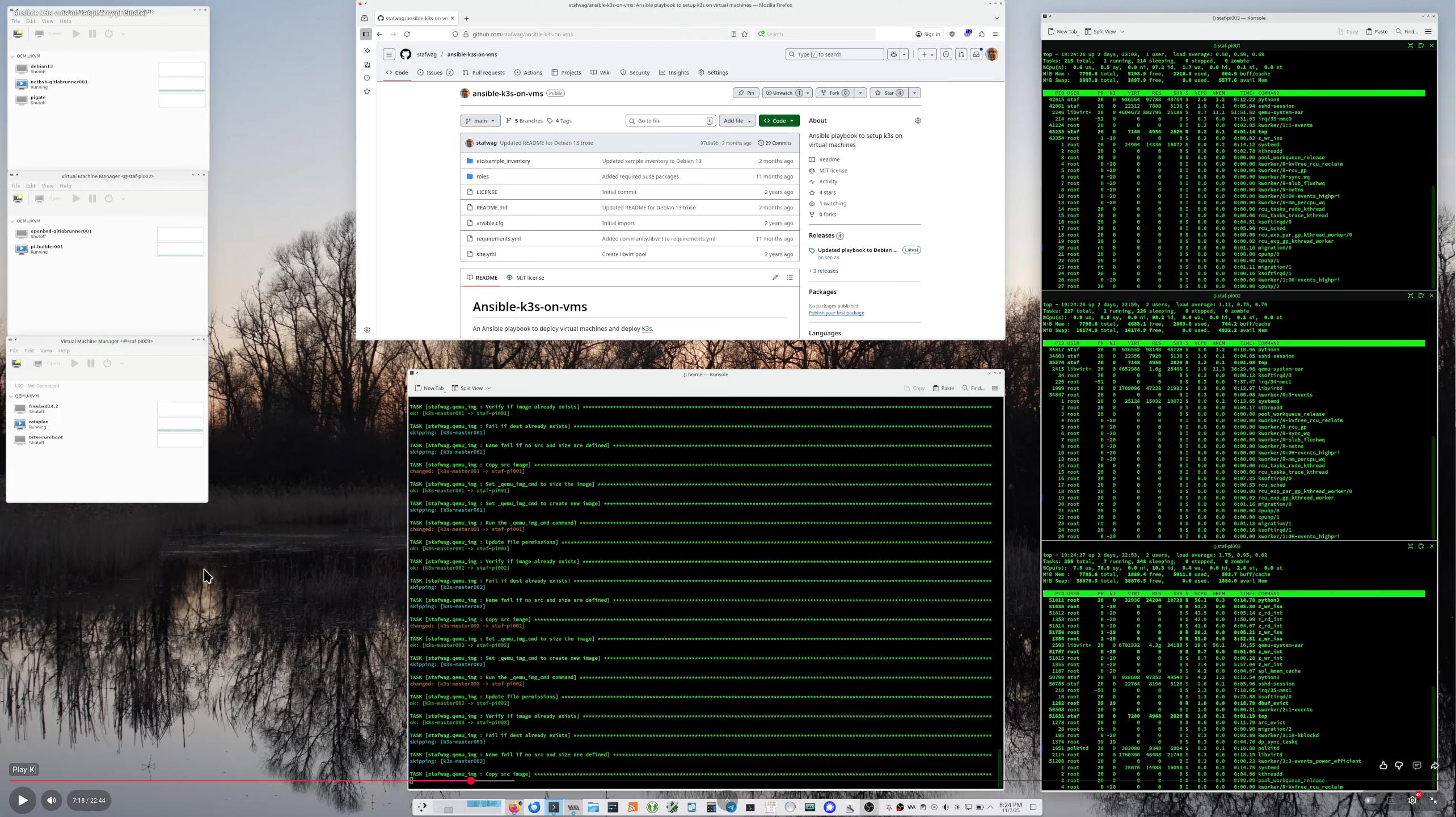
<p>And created a few ansible roles to provision the virtual machines with cloud image with cloud-init and deploy k3s on it.</p>

<p>I updated the roles below to be compatible with the latest Debian release: Debian 13 Trixie.</p>

<p>With this release comes a new movie ;-)</p>

<p><a href="https://www.youtube.com/watch?v=4K6D_wzETpQ" title="Deploy k3s on ips"><img src="https://blog.wagemakers.be/images/ansible-k3s-on-vms/ansible-k3s-pi-deployment_1440.jpg" alt="Deploy k3s on ips" /></a></p>

<!--more-->

<p>The latest version 1.3.0 is available at: <a href="https://github.com/stafwag/ansible-k3s-on-vms">https://github.com/stafwag/ansible-k3s-on-vms</a></p>

<p><br /></p>

<p><strong><em>Have fun!</em></strong></p>

<h1 id="delegated_vm_install-211">delegated_vm_install 2.1.1</h1>

<p>stafwag.delegated_vm_install  is available at:
<a href="https://github.com/stafwag/ansible-role-delegated_vm_install">https://github.com/stafwag/ansible-role-delegated_vm_install</a></p>

<h3 id="211">2.1.1</h3>
<h4 id="changelog">Changelog</h4>

<ul>
  <li>Added stafwag.libvirt to requirements</li>
  <li>Added stafwag.package_update to requirements</li>
</ul>

<h3 id="210">2.1.0</h3>
<h4 id="changelog-1">Changelog</h4>

<ul>
  <li>Added Debian 13 template</li>
  <li>Added Debian 13 single node examples</li>
  <li>Updated 3 node example to Debian 13</li>
</ul>

<p><br /></p>

<h1 id="virt_install_vm-120">virt_install_vm 1.2.0</h1>

<p>stafwag.virt_install_vm 1.1.0 is available at: <a href="https://github.com/stafwag/ansible-role-virt_install_vm">https://github.com/stafwag/ansible-role-virt_install_vm</a></p>

<h3 id="120">1.2.0</h3>
<h4 id="changelog-2">Changelog</h4>

<ul>
  <li>Added Debian 13 template and example</li>
  <li>Set graphics to VNC</li>
</ul>

<p><br /></p>

<h1 id="qemu_img">qemu_img</h1>

<p>stafwag.qemu_img 2.3.3 available at: <a href="https://github.com/stafwag/ansible-role-qemu_img">https://github.com/stafwag/ansible-role-qemu_img</a></p>

<h3 id="120-1">1.2.0</h3>
<h4 id="changelog-3">Changelog</h4>

<ul>
  <li>Corrected ansible lint errors</li>
  <li>Updated convert to array
    <ul>
      <li>Updated conversion to array to be compatible with the latest ansible versions</li>
      <li>Added debugging</li>
    </ul>
  </li>
</ul>]]></content><author><name>Staf Wagemakers</name></author><category term="ansible" /><category term="debian" /><category term="k3s" /><category term="kubernetes" /><category term="cloudinit" /><category term="linux" /><summary type="html"><![CDATA[I use the lightweight Kubernetes K3s on a 3-node Raspberry Pi 4 cluster. And created a few ansible roles to provision the virtual machines with cloud image with cloud-init and deploy k3s on it. I updated the roles below to be compatible with the latest Debian release: Debian 13 Trixie. With this release comes a new movie ;-)]]></summary></entry><entry><title type="html">Lookat 2.1.0 released</title><link href="https://blog.wagemakers.be/blog/2025/09/14/lookat-2-dot-1-0-released/" rel="alternate" type="text/html" title="Lookat 2.1.0 released" /><published>2025-09-14T20:04:00+02:00</published><updated>2025-09-14T20:04:00+02:00</updated><id>https://blog.wagemakers.be/blog/2025/09/14/lookat-2-dot-1-0-released</id><content type="html" xml:base="https://blog.wagemakers.be/blog/2025/09/14/lookat-2-dot-1-0-released/"><![CDATA[<p><a href="https://blog.wagemakers.be/images/lookat/lookat_2_1_0.png"><img src="https://blog.wagemakers.be/images/lookat/lookat_2_1_0.png" class="right" width="600" height="320" alt="lookat 2.1.0" /> </a></p>

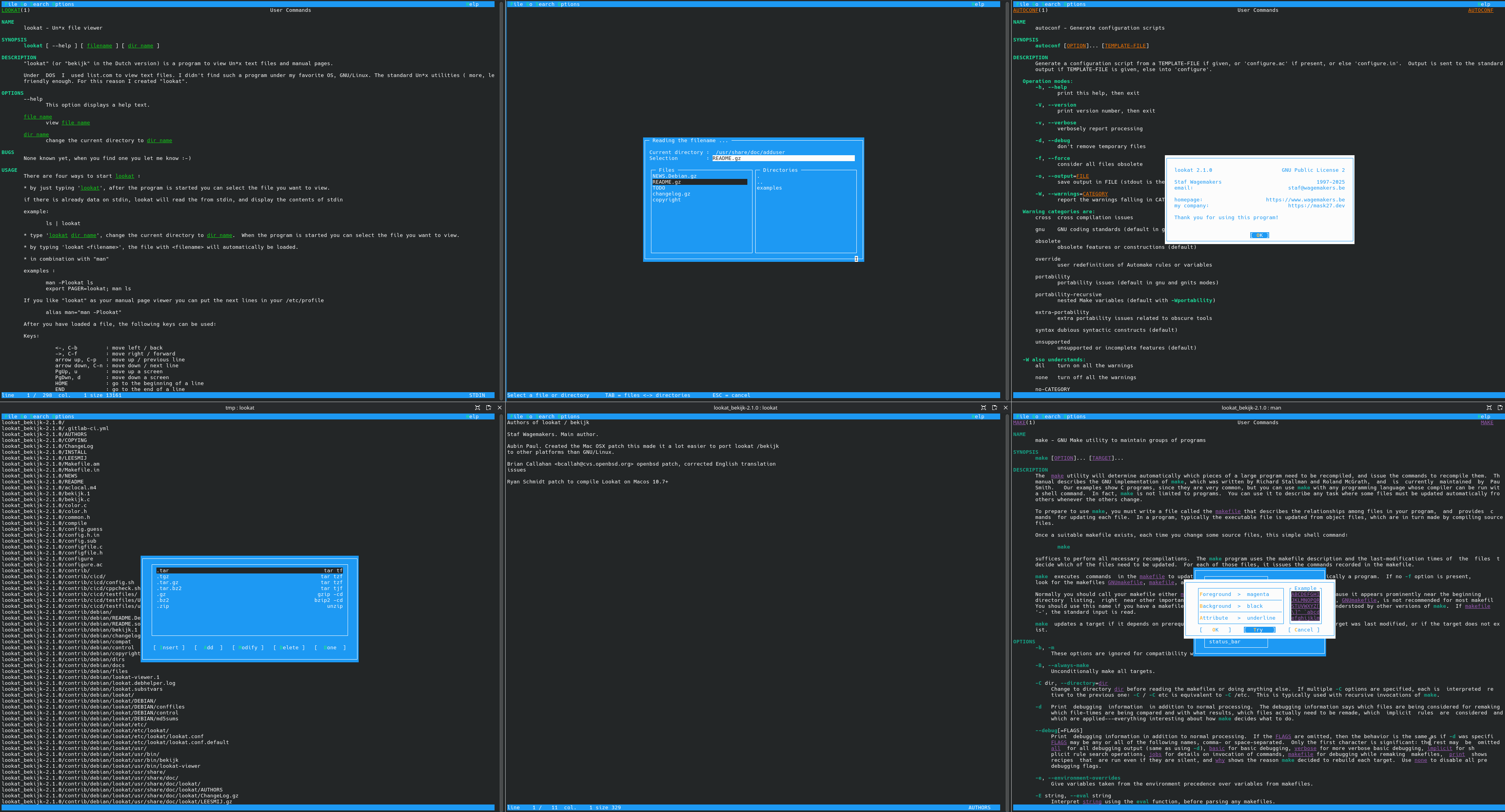
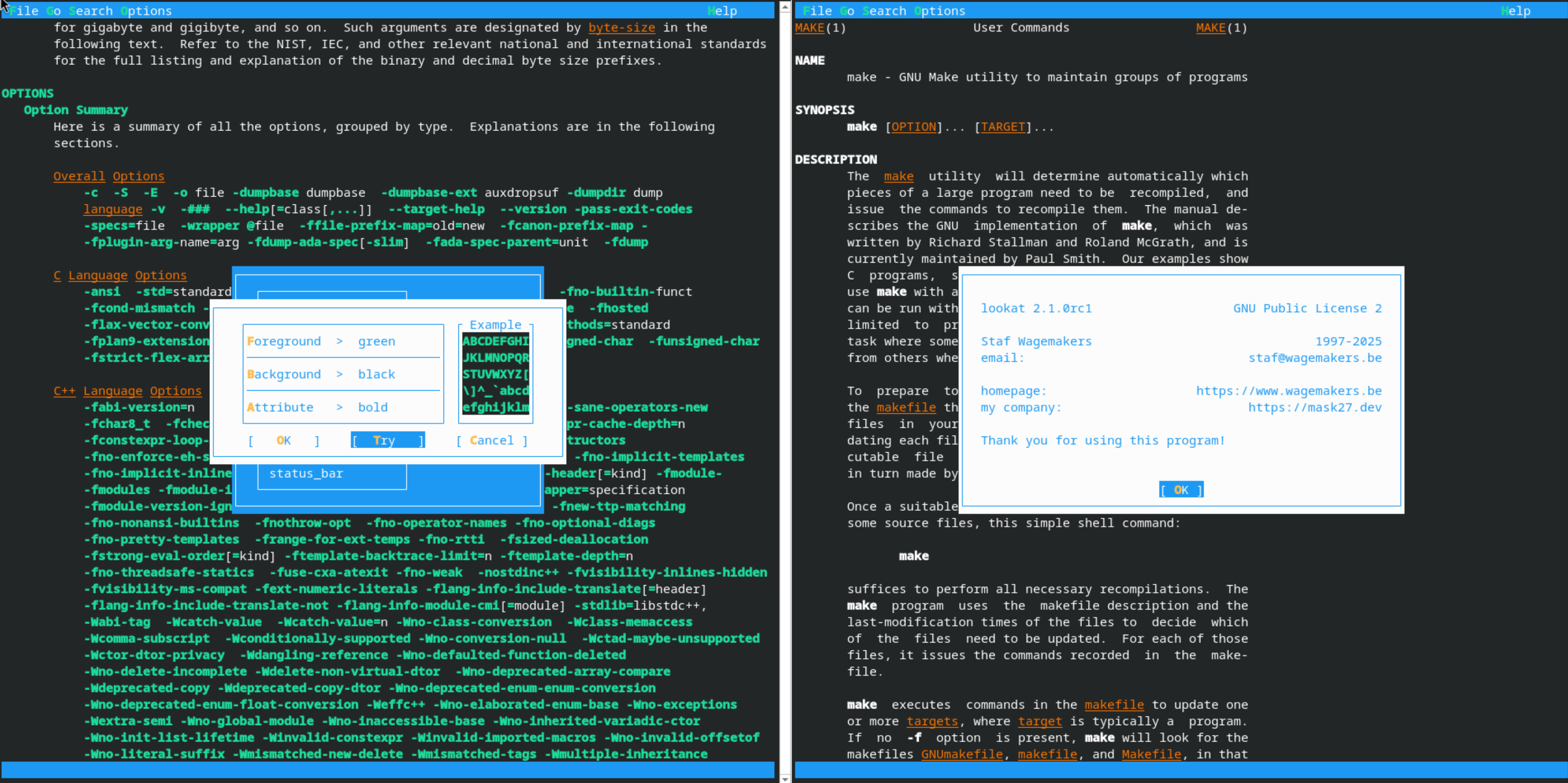
<p>Lookat 2.1.0 is the latest stable release of Lookat/Bekijk, a user-friendly Unix file browser/viewer that supports colored man pages.</p>

<p>The focus of the 2.1.0 release is to add ANSI Color support.</p>

<p><br /> <br /></p>

<h2 id="news">News</h2>

<h3 id="14-sep-2025-lookat-210-released"><strong>14 Sep 2025</strong> Lookat 2.1.0 Released</h3>

<p>Lookat / Bekijk 2.1.0rc2 has been released as Lookat / Bekijk 2.1.0</p>

<h3 id="3-aug-2025-lookat-210rc2-released"><strong>3 Aug 2025</strong> Lookat 2.1.0rc2 Released</h3>

<p>Lookat 2.1.0rc2 is the second release candicate of Lookat 2.1.0</p>

<h4 id="changelog">ChangeLog</h4>

<h5 id="lookat--bekijk-210rc2">Lookat / Bekijk 2.1.0rc2</h5>

<ul>
  <li>Corrected italic color</li>
  <li>Don’t reset the search offset when cursor mode is enabled</li>
  <li>Renamed strsize to charsize ( ansi_strsize -&gt; ansi_charsize, utf8_strsize -&gt; utf8_charsize) to be less confusing</li>
  <li>Support for multiple ansi streams in ansi_utf8_strlen()</li>
  <li>Update default color theme to green for this release</li>
  <li>Update manpages &amp; documentation</li>
  <li>Reorganized contrib directory
    <ul>
      <li>Moved ci/cd related file from contrib/* to contrib/cicd</li>
      <li>Moved debian dir to contrib/dist</li>
      <li>Moved support script to contrib/scripts</li>
    </ul>
  </li>
</ul>

<!--more-->

<h4 id="lookat-210-is-available-at">Lookat 2.1.0 is available at:</h4>

<ul>
  <li><a href="https://www.wagemakers.be/english/programs/lookat/">https://www.wagemakers.be/english/programs/lookat/</a></li>
  <li>Download it directly from <a href="https://download-mirror.savannah.gnu.org/releases/lookat/">https://download-mirror.savannah.gnu.org/releases/lookat/</a></li>
  <li>Or at the Git repository at GNU savannah <a href="https://cgit.git.savannah.gnu.org/cgit/lookat.git/">https://git.savannah.gnu.org/cgit/lookat.git/</a></li>
</ul>

<p><strong><em>Have fun!</em></strong></p>]]></content><author><name>Staf Wagemakers</name></author><category term="lookat" /><category term="linux" /><category term="bsd" /><category term="freebsd" /><category term="netbsd" /><category term="openbsd" /><category term="ncurses" /><category term="manpage" /><summary type="html"><![CDATA[Lookat 2.1.0 is the latest stable release of Lookat/Bekijk, a user-friendly Unix file browser/viewer that supports colored man pages. The focus of the 2.1.0 release is to add ANSI Color support.   News 14 Sep 2025 Lookat 2.1.0 Released Lookat / Bekijk 2.1.0rc2 has been released as Lookat / Bekijk 2.1.0 3 Aug 2025 Lookat 2.1.0rc2 Released Lookat 2.1.0rc2 is the second release candicate of Lookat 2.1.0 ChangeLog Lookat / Bekijk 2.1.0rc2 Corrected italic color Don’t reset the search offset when cursor mode is enabled Renamed strsize to charsize ( ansi_strsize -&gt; ansi_charsize, utf8_strsize -&gt; utf8_charsize) to be less confusing Support for multiple ansi streams in ansi_utf8_strlen() Update default color theme to green for this release Update manpages &amp; documentation Reorganized contrib directory Moved ci/cd related file from contrib/* to contrib/cicd Moved debian dir to contrib/dist Moved support script to contrib/scripts]]></summary></entry><entry><title type="html">Lookat 2.1.0rc2 released</title><link href="https://blog.wagemakers.be/blog/2025/08/03/lookat-2-dot-1-0rc2-released/" rel="alternate" type="text/html" title="Lookat 2.1.0rc2 released" /><published>2025-08-03T11:48:50+02:00</published><updated>2025-08-03T11:48:50+02:00</updated><id>https://blog.wagemakers.be/blog/2025/08/03/lookat-2-dot-1-0rc2-released</id><content type="html" xml:base="https://blog.wagemakers.be/blog/2025/08/03/lookat-2-dot-1-0rc2-released/"><![CDATA[<p><a href="https://blog.wagemakers.be/images/lookat/lookat_2_1_0rc2.png"><img src="https://blog.wagemakers.be/images/lookat/lookat_2_1_0rc2.png" class="right" width="600" height="320" alt="lookat 2.1.0rc1" /> </a></p>

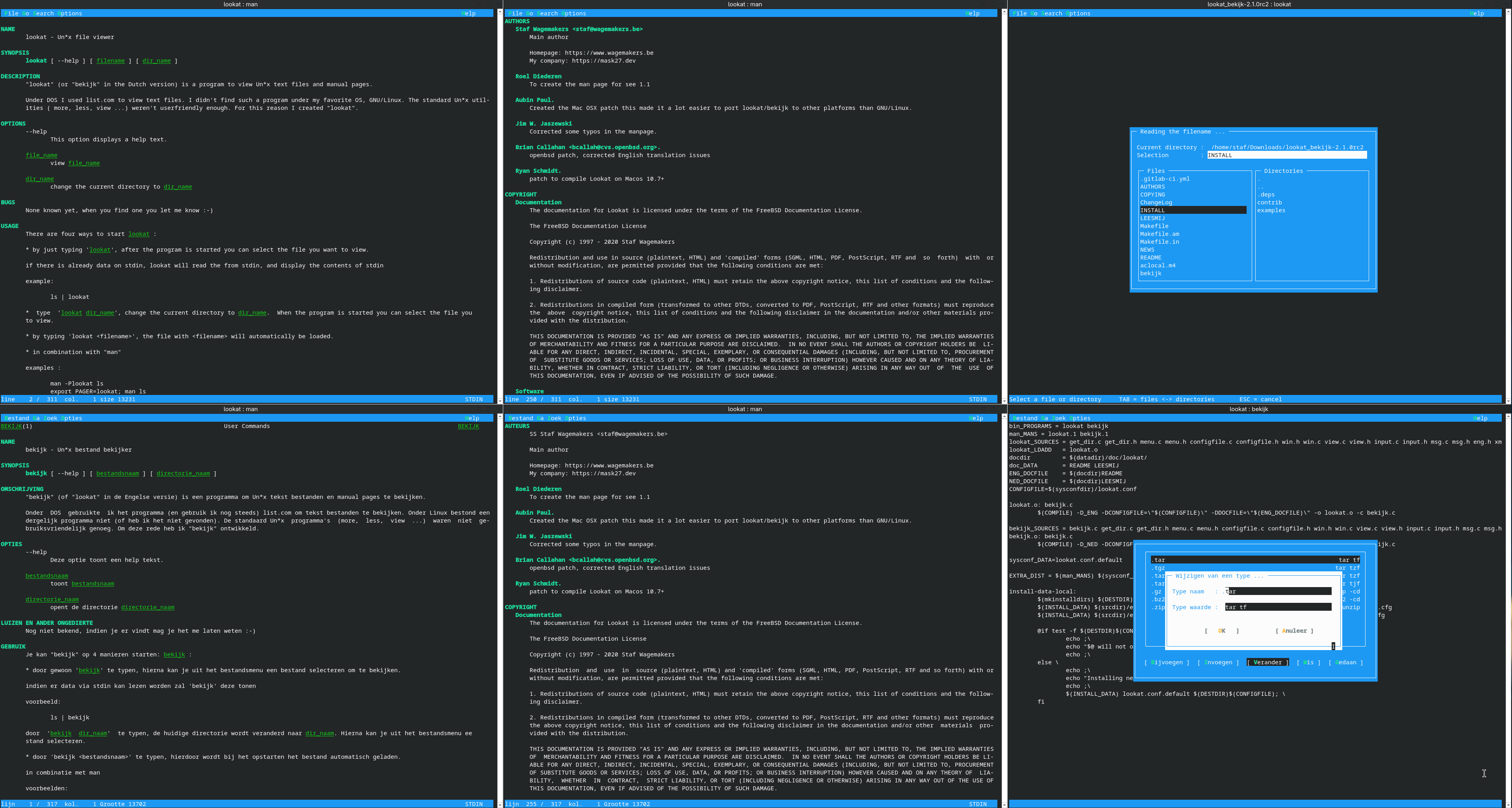
<p>Lookat 2.1.0rc2 is the second release candicate of release of Lookat/Bekijk 2.1.0, a user-friendly Unix file browser/viewer that supports colored man pages.</p>

<p>The focus of the 2.1.0 release is to add ANSI Color support.</p>

<p><br /> <br /></p>

<h2 id="news">News</h2>

<h3 id="3-aug-2025-lookat-210rc2-released"><strong>3 Aug 2025</strong> Lookat 2.1.0rc2 Released</h3>

<p>Lookat 2.1.0rc2 is the second release candicate of Lookat 2.1.0</p>

<h4 id="changelog">ChangeLog</h4>

<h5 id="lookat--bekijk-210rc2">Lookat / Bekijk 2.1.0rc2</h5>

<ul>
  <li>Corrected italic color</li>
  <li>Don’t reset the search offset when cursor mode is enabled</li>
  <li>Renamed strsize to charsize ( ansi_strsize -&gt; ansi_charsize, utf8_strsize -&gt; utf8_charsize) to be less confusing</li>
  <li>Support for multiple ansi streams in ansi_utf8_strlen()</li>
  <li>Update default color theme to green for this release</li>
  <li>Update manpages &amp; documentation</li>
  <li>Reorganized contrib directory
    <ul>
      <li>Moved ci/cd related file from contrib/* to contrib/cicd</li>
      <li>Moved debian dir to contrib/dist</li>
      <li>Moved support script to contrib/scripts</li>
    </ul>
  </li>
</ul>

<!--more-->

<h4 id="lookat-210rc2-is-available-at">Lookat 2.1.0rc2 is available at:</h4>

<ul>
  <li><a href="https://www.wagemakers.be/english/programs/lookat/">https://www.wagemakers.be/english/programs/lookat/</a></li>
  <li>Download it directly from <a href="https://download-mirror.savannah.gnu.org/releases/lookat/">https://download-mirror.savannah.gnu.org/releases/lookat/</a></li>
  <li>Or at the Git repository at GNU savannah <a href="https://cgit.git.savannah.gnu.org/cgit/lookat.git/">https://git.savannah.gnu.org/cgit/lookat.git/</a></li>
</ul>

<p><strong><em>Have fun!</em></strong></p>]]></content><author><name>Staf Wagemakers</name></author><category term="lookat" /><category term="linux" /><category term="bsd" /><category term="freebsd" /><category term="netbsd" /><category term="openbsd" /><category term="ncurses" /><category term="manpage" /><summary type="html"><![CDATA[Lookat 2.1.0rc2 is the second release candicate of release of Lookat/Bekijk 2.1.0, a user-friendly Unix file browser/viewer that supports colored man pages. The focus of the 2.1.0 release is to add ANSI Color support.   News 3 Aug 2025 Lookat 2.1.0rc2 Released Lookat 2.1.0rc2 is the second release candicate of Lookat 2.1.0 ChangeLog Lookat / Bekijk 2.1.0rc2 Corrected italic color Don’t reset the search offset when cursor mode is enabled Renamed strsize to charsize ( ansi_strsize -&gt; ansi_charsize, utf8_strsize -&gt; utf8_charsize) to be less confusing Support for multiple ansi streams in ansi_utf8_strlen() Update default color theme to green for this release Update manpages &amp; documentation Reorganized contrib directory Moved ci/cd related file from contrib/* to contrib/cicd Moved debian dir to contrib/dist Moved support script to contrib/scripts]]></summary></entry><entry><title type="html">Using OpenTofu/Terraform to create a disposable Tails virtual machine</title><link href="https://blog.wagemakers.be/blog/2025/06/22/using-opentofu-to-create-tails-environment/" rel="alternate" type="text/html" title="Using OpenTofu/Terraform to create a disposable Tails virtual machine" /><published>2025-06-22T08:37:00+02:00</published><updated>2025-06-22T08:37:00+02:00</updated><id>https://blog.wagemakers.be/blog/2025/06/22/using-opentofu-to-create-tails-environment</id><content type="html" xml:base="https://blog.wagemakers.be/blog/2025/06/22/using-opentofu-to-create-tails-environment/"><![CDATA[<p><a href="https://blog.wagemakers.be/images/opentofu/opentofu_square.png"><img src="https://blog.wagemakers.be/images/opentofu/opentofu_square.png" class="left" width="264" height="191" alt="OpenTofu" /> </a></p>

<h2 id="opentofu">OpenTofu</h2>

<p><a href="https://developer.hashicorp.com/terraform">Terraform</a> or <a href="https://opentofu.org/">OpenTofu</a> (the open-source fork <a href="https://www.linuxfoundation.org/press/announcing-opentofu">supported by the Linux Foundation</a>) is a nice tool to setup the infrastructure
on different cloud environments. There is also a provider that supports <a href="https://libvirt.org/">libvirt</a>.</p>

<ul>
  <li><a href="https://github.com/dmacvicar/terraform-provider-libvirt">https://github.com/dmacvicar/terraform-provider-libvirt</a></li>
</ul>

<p>If you want to get started with OpenTofu there is a free training available from the Linux foundation:</p>

<ul>
  <li><a href="https://training.linuxfoundation.org/express-learning/getting-started-with-opentofu-lfel1009/">https://training.linuxfoundation.org/express-learning/getting-started-with-opentofu-lfel1009/</a></li>
</ul>

<p>I also joined the talk about OpenTofu and <a href="https://en.wikipedia.org/wiki/Infrastructure_as_code">Infrastructure As Code</a>, in general, this year in the <a href="https://fosdem.org/2025/schedule/track/virtualization/">Virtualization and Cloud Infrastructure</a> DEV Room at <a href="https://fosdem.org">FOSDEM</a> this year:</p>

<ul>
  <li><a href="https://fosdem.org/2025/schedule/event/fosdem-2025-6057-the-iac-tooling-multiverse-and-the-future-of-iac/">https://fosdem.org/2025/schedule/event/fosdem-2025-6057-the-iac-tooling-multiverse-and-the-future-of-iac/</a></li>
</ul>

<!--more-->

<p>I’ll not start to explain “Declarative” vs “Imperative” in this blog post, there’re already enough blog posts or websites that’re (trying) to explain this in more detail (the links above are a good start).</p>

<p>The default behaviour of OpenTofu is not to try to update an existing environment. This makes it usable to create disposable environments.</p>

<p><a href="https://blog.wagemakers.be/images/tails/tails_description.png"><img src="https://blog.wagemakers.be/images/tails/tails_description.png" class="right" width="320" height="135" alt="Tails description" /> </a></p>

<h2 id="tails">Tails</h2>

<p><a href="https://tails.net/">Tails</a> is a nice GNU/Linux distribution to connect to the <a href="https://www.torproject.org/">Tor network</a>.</p>

<p>Personally, I’m less into the “privacy” aspect of the Tor network (although being aware that you’re tracked and followed is important), probably because I’m lucky to live in the “Free world”.</p>

<p>For people who are less lucky (People who live in a country where freedom of speech isn’t valued) or journalists for example, there’re good reasons to use the Tor network and hide their internet traffic.</p>

<h2 id="tailslibvirt-terraformopentofu-module">tails/libvirt Terraform/OpenTofu module</h2>

<p><a href="https://blog.wagemakers.be/images/tails/terraform-libvirt-tails.png"><img src="https://blog.wagemakers.be/images/tails/terraform-libvirt-tails.png" class="right" width="484" height="142" alt="OpenTofu" /> </a></p>

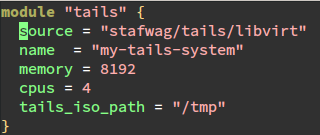
<p>To make it easier to spin up a virtual machine with the latest tail environment I created a Terraform/OpenTofu module to spin up a virtual machine with the latest Tails version on
libvirt.</p>

<p>There’re security considerations when you run tails in a virtual machine.
See</p>

<ul>
  <li><a href="https://tails.net/doc/advanced_topics/virtualization/index.en.html">https://tails.net/doc/advanced_topics/virtualization/index.en.html</a></li>
</ul>

<p>for more information.</p>

<p>The source code of the module is available at the git repository:</p>

<ul>
  <li><a href="https://github.com/stafwag/terraform-libvirt-tails">https://github.com/stafwag/terraform-libvirt-tails</a></li>
</ul>

<p>The module is published on the <a href="https://registry.terraform.io/">Terraform Registry</a> and
the <a href="https://opentofu.org/registry/">OpenTofu Registry</a>.</p>

<p><strong><em>Have fun!</em></strong></p>]]></content><author><name>Staf Wagemakers</name></author><category term="tails" /><category term="tor" /><category term="linux" /><category term="libvirt" /><category term="opentofu" /><category term="terraform" /><category term="fosdem" /><summary type="html"><![CDATA[OpenTofu Terraform or OpenTofu (the open-source fork supported by the Linux Foundation) is a nice tool to setup the infrastructure on different cloud environments. There is also a provider that supports libvirt. https://github.com/dmacvicar/terraform-provider-libvirt If you want to get started with OpenTofu there is a free training available from the Linux foundation: https://training.linuxfoundation.org/express-learning/getting-started-with-opentofu-lfel1009/ I also joined the talk about OpenTofu and Infrastructure As Code, in general, this year in the Virtualization and Cloud Infrastructure DEV Room at FOSDEM this year: https://fosdem.org/2025/schedule/event/fosdem-2025-6057-the-iac-tooling-multiverse-and-the-future-of-iac/]]></summary></entry><entry><title type="html">Lookat 2.1.0rc1 released</title><link href="https://blog.wagemakers.be/blog/2025/06/08/lookat-2-dot-1-0rc1-released/" rel="alternate" type="text/html" title="Lookat 2.1.0rc1 released" /><published>2025-06-08T11:48:50+02:00</published><updated>2025-06-08T11:48:50+02:00</updated><id>https://blog.wagemakers.be/blog/2025/06/08/lookat-2-dot-1-0rc1-released</id><content type="html" xml:base="https://blog.wagemakers.be/blog/2025/06/08/lookat-2-dot-1-0rc1-released/"><![CDATA[<p><a href="https://blog.wagemakers.be/images/lookat/lookat_2_1_0rc1.png"><img src="https://blog.wagemakers.be/images/lookat/lookat_2_1_0rc1.png" class="left" width="600" height="300" alt="lookat 2.1.0rc1" /> </a></p>

<p>Lookat 2.1.0rc1 is the latest development release of Lookat/Bekijk, a user-friendly Unix file browser/viewer that supports colored man pages.</p>

<p>The focus of the 2.1.0 release is to add ANSI Color support.</p>

<p><br /> <br /></p>

<h2 id="news">News</h2>

<h3 id="8-jun-2025-lookat-210rc1-released"><strong>8 Jun 2025</strong> Lookat 2.1.0rc1 Released</h3>

<p>Lookat 2.1.0rc1 is the first release candicate of Lookat 2.1.0</p>

<h4 id="changelog">ChangeLog</h4>

<h5 id="lookat--bekijk-210rc1">Lookat / Bekijk 2.1.0rc1</h5>
<ul>
  <li>ANSI Color support</li>
</ul>

<!--more-->

<h4 id="lookat-210rc1-is-available-at">Lookat 2.1.0rc1 is available at:</h4>

<ul>
  <li><a href="https://www.wagemakers.be/english/programs/lookat/">https://www.wagemakers.be/english/programs/lookat/</a></li>
  <li>Download it directly from <a href="https://download-mirror.savannah.gnu.org/releases/lookat/">https://download-mirror.savannah.gnu.org/releases/lookat/</a></li>
  <li>Or at the Git repository at GNU savannah <a href="https://cgit.git.savannah.gnu.org/cgit/lookat.git/">https://git.savannah.gnu.org/cgit/lookat.git/</a></li>
</ul>

<p><strong><em>Have fun!</em></strong></p>]]></content><author><name>Staf Wagemakers</name></author><category term="lookat" /><category term="linux" /><category term="bsd" /><category term="freebsd" /><category term="netbsd" /><category term="openbsd" /><category term="ncurses" /><category term="manpage" /><summary type="html"><![CDATA[Lookat 2.1.0rc1 is the latest development release of Lookat/Bekijk, a user-friendly Unix file browser/viewer that supports colored man pages. The focus of the 2.1.0 release is to add ANSI Color support.   News 8 Jun 2025 Lookat 2.1.0rc1 Released Lookat 2.1.0rc1 is the first release candicate of Lookat 2.1.0 ChangeLog Lookat / Bekijk 2.1.0rc1 ANSI Color support]]></summary></entry><entry><title type="html">#eXit : Goodbye twitter. Hi Mastodon…</title><link href="https://blog.wagemakers.be/blog/2025/05/11/leaving_twitter/" rel="alternate" type="text/html" title="#eXit : Goodbye twitter. Hi Mastodon…" /><published>2025-05-11T11:29:07+02:00</published><updated>2025-05-11T11:29:07+02:00</updated><id>https://blog.wagemakers.be/blog/2025/05/11/leaving_twitter</id><content type="html" xml:base="https://blog.wagemakers.be/blog/2025/05/11/leaving_twitter/"><![CDATA[<p><a href="https://blog.wagemakers.be/images/mastodon/welcome.jpg"><img src="https://blog.wagemakers.be/images/mastodon/welcome.jpg" class="left" width="400" height="300" alt="Plushtodon" /> </a></p>

<p>I decided to leave <a href="https://www.twitter">twitter</a>.
<br /> <br />
Yes, this has something to do with the change of ownership, the name change to x, …
<br /> <br />
There is only 1 X to me, and that’s <a href="https://www.x.org/">X.org</a></p>

<p>Twitter has become a platform that doesn’t value #freedomofspeech anymore.</p>

<p>My account even got flagged as possible spam to “factchecking” #fakenews</p>

<p>The mean reason is that there is a better alternative in the form of the
<a href="https://en.wikipedia.org/wiki/Fediverse">Fediverse</a> #Fediverse is the protocol that 
<a href="https://mastodon.social/">Mastodon</a> uses.</p>

<p>It allows for a truly decentralised social media platform.</p>

<p>It allows organizations to set up their own Mastodon instance and take ownership and accountability for their content and accounts.</p>

<p>Mastodon is a nice platform; you probably feel at home there.</p>

<p>People who follow me on twitter can continue to follow me at Mastodon if they want.</p>

<p><a href="https://mastodon.social/@stafwag">https://mastodon.social/@stafwag</a></p>

<p>I’ll post this message a couple of times to twitter before I close my twitter account, so people can decide if they want to follow me on
Mastodon …or not ;-).</p>

<p><strong><em>Have fun!</em></strong></p>]]></content><author><name>Staf Wagemakers</name></author><category term="twitter" /><category term="mastodon" /><category term="fediverse" /><category term="eXit" /><category term="freedomofspeech" /><summary type="html"><![CDATA[I decided to leave twitter.   Yes, this has something to do with the change of ownership, the name change to x, …   There is only 1 X to me, and that’s X.org Twitter has become a platform that doesn’t value #freedomofspeech anymore. My account even got flagged as possible spam to “factchecking” #fakenews The mean reason is that there is a better alternative in the form of the Fediverse #Fediverse is the protocol that Mastodon uses. It allows for a truly decentralised social media platform. It allows organizations to set up their own Mastodon instance and take ownership and accountability for their content and accounts. Mastodon is a nice platform; you probably feel at home there. People who follow me on twitter can continue to follow me at Mastodon if they want. https://mastodon.social/@stafwag I’ll post this message a couple of times to twitter before I close my twitter account, so people can decide if they want to follow me on Mastodon …or not ;-). Have fun!]]></summary></entry><entry><title type="html">docker-stafwag-unbound v2.1.0 released: Use unbound as an DNS-over-TLS resolver and authoritative DNS server</title><link href="https://blog.wagemakers.be/blog/2025/05/04/use-unbound-as-dns-over-tls-and-authoritative-dns-server_v2.1.0/" rel="alternate" type="text/html" title="docker-stafwag-unbound v2.1.0 released: Use unbound as an DNS-over-TLS resolver and authoritative DNS server" /><published>2025-05-04T17:01:01+02:00</published><updated>2025-05-04T17:01:01+02:00</updated><id>https://blog.wagemakers.be/blog/2025/05/04/use-unbound-as-dns-over-tls-and-authoritative-dns-server_v2.1.0</id><content type="html" xml:base="https://blog.wagemakers.be/blog/2025/05/04/use-unbound-as-dns-over-tls-and-authoritative-dns-server_v2.1.0/"><![CDATA[<p><a href="https://blog.wagemakers.be/images/unbound/Unbound_FC_Shaded_cropped.svg"><img src="https://blog.wagemakers.be/images/unbound/Unbound_FC_Shaded_cropped.svg" class="left" width="400" height="91" alt="Unbound" /> </a></p>

<p><a href="https://www.nlnetlabs.nl/projects/unbound/about/">Unbound</a> is a popular DNS resolver, that has native DNS-over-TLS support.
<br /> <br /></p>

<p>Unbound and <a href="https://dnsprivacy.org/dns_privacy_daemon_-_stubby/">Stubby</a> were among the first resolvers to implement DNS-over-TLS.</p>

<p>I wrote a few blog posts on how to use Stubby on GNU/Linux and FreeBSD.</p>

<ul>
  <li><a href="https://blog.wagemakers.be/blog/2018/09/09/dns-privacy-with-stubby-part1-gnulinux/">https://blog.wagemakers.be/blog/2018/09/09/dns-privacy-with-stubby-part1-gnulinux/</a></li>
  <li><a href="https://blog.wagemakers.be/blog/2018/10/07/dns-privacy-with-stubby-part-2-freebsd/">https://blog.wagemakers.be/blog/2018/10/07/dns-privacy-with-stubby-part-2-freebsd/</a></li>
</ul>

<p>The implementation status of DNS-over-TLS and other DNS privacy options is available at: <a href="https://dnsprivacy.org/">https://dnsprivacy.org/</a>.</p>

<p>See <a href="https://dnsprivacy.org/implementation_status/">https://dnsprivacy.org/implementation_status/</a> for more details.</p>

<p>It’s less known that it can also be used as authoritative DNS server (aka a real DNS server).
Since I discovered this feature and Unbound got native DNS-over-TLS support I started to it as my DNS server.</p>

<p>I created a docker container for it a couple of years back to use it as an authoritative DNS server.</p>

<p>I recently updated the container, the latest version (2.1.0) is available at: <a href="https://github.com/stafwag/docker-stafwag-unbound">https://github.com/stafwag/docker-stafwag-unbound</a></p>

<h1 id="changelog">ChangeLog</h1>
<h2 id="version-210">Version 2.1.0</h2>
<h3 id="upgrade-to-debianbookworm">Upgrade to debian:bookworm</h3>

<ul>
  <li>Updated BASE_IMAGE to debian:bookworm</li>
  <li>Add ARG DEBIAN_FRONTEND=noninteractive</li>
  <li>Run unbound-control-setup to generate the default certificate</li>
  <li>Documentation updated</li>
</ul>

<!--more-->

<h2><br /> <br /></h2>

<h1 id="docker-stafwag-unbound">docker-stafwag-unbound</h1>

<p><code class="language-plaintext highlighter-rouge">Dockerfile</code> to run unbound inside a docker container.
The unbound daemon will run as the unbound user. The uid/gid is mapped to
5000153.</p>

<h2 id="installation">Installation</h2>

<h3 id="clone-the-git-repo">clone the git repo</h3>

<div class="language-plaintext highlighter-rouge"><div class="highlight"><pre class="highlight"><code>$ git clone https://github.com/stafwag/docker-stafwag-unbound.git
$ cd docker-stafwag-unbound
</code></pre></div></div>

<h3 id="configuration">Configuration</h3>

<h4 id="port">Port</h4>

<p>The default DNS port is set to <code class="language-plaintext highlighter-rouge">5353</code> this port is mapped with the docker command to the default port 53 (see below).
If you want to use another port, you can edit <code class="language-plaintext highlighter-rouge">etc/unbound/unbound.conf.d/interface.conf</code>.</p>

<h4 id="scriptscreate_zone_configsh-helper-script"><code class="language-plaintext highlighter-rouge">scripts/create_zone_config.sh</code> helper script</h4>

<p>The <code class="language-plaintext highlighter-rouge">create_zone_config.sh</code> helper script, can help you to create the <code class="language-plaintext highlighter-rouge">zones.conf</code> configuration file.
It’s executed during the container build and creates the zones.conf from the datafiles in <code class="language-plaintext highlighter-rouge">etc/unbound/zones</code>.</p>

<p>If you want to use a docker volume or configmaps/persistent volumes on Kubernetes. You can use this script to
generate the <code class="language-plaintext highlighter-rouge">zones.conf</code> a zones data directory.</p>

<p><code class="language-plaintext highlighter-rouge">create_zone_config.sh</code> has following arguments:</p>

<ul>
  <li><strong>-f</strong> Default: /etc/unbound/unbound.conf.d/zones.conf
The zones.conf file to create</li>
  <li><strong>-d</strong> Default: /etc/unbound/zones/
The zones data source files</li>
  <li><strong>-p</strong> Default: the realpath of zone files</li>
  <li><strong>-s</strong> Skip chown/chmod</li>
</ul>

<h4 id="use-unbound-as-an-authoritative-dns-server">Use unbound as an authoritative DNS server</h4>

<p>To use unbound as an authoritative authoritive DNS server - a DNS server that hosts DNS zones - add your zones file <code class="language-plaintext highlighter-rouge">etc/unbound/zones/</code>.</p>

<p>During the creation of the image <code class="language-plaintext highlighter-rouge">scripts/create_zone_config.sh</code> is executed to create the zones configuration file.</p>

<p>Alternatively, you can also use a docker volume to mount <code class="language-plaintext highlighter-rouge">/etc/unbound/zones/</code> to your zone files. And a volume mount for the <code class="language-plaintext highlighter-rouge">zones.conf</code>
configuration file.</p>

<p>You can use subdirectories. The zone file needs to have <code class="language-plaintext highlighter-rouge">$ORIGIN</code> set to our zone origin.</p>

<h4 id="use-dns-over-tls">Use DNS-over-TLS</h4>

<p>The default configuration uses <a href="https://www.quad9.net/">quad9</a> to forward the DNS queries over TLS. 
If you want to use another vendor or you want to use the root DNS servers director you can remove this file.</p>

<h3 id="build-the-image">Build the image</h3>

<div class="language-plaintext highlighter-rouge"><div class="highlight"><pre class="highlight"><code>$ docker build -t stafwag/unbound . 
</code></pre></div></div>

<p>To use a different BASE_IMAGE, you can use the –build-arg BASE_IMAGE=your_base_image.</p>

<div class="language-plaintext highlighter-rouge"><div class="highlight"><pre class="highlight"><code>$ docker build --build-arg BASE_IMAGE=stafwag/debian:bookworm -t stafwag/unbound .
</code></pre></div></div>

<h2 id="run">Run</h2>

<h3 id="recursive-dns-server-with-dns-over-tls">Recursive DNS server with DNS-over-TLS</h3>

<p>Run</p>

<div class="language-plaintext highlighter-rouge"><div class="highlight"><pre class="highlight"><code>$ docker run -d --rm --name myunbound -p 127.0.0.1:53:5353 -p 127.0.0.1:53:5353/udp stafwag/unbound
</code></pre></div></div>

<p>Test</p>

<div class="language-plaintext highlighter-rouge"><div class="highlight"><pre class="highlight"><code>$ dig @127.0.0.1 www.wagemakers.be
</code></pre></div></div>

<h3 id="authoritative-dns-server">Authoritative dns server.</h3>

<p>If you want to use unbound as an authoritative dns server you can use the steps below.</p>

<h4 id="create-a-directory-with-your-zone-files">Create a directory with your zone files:</h4>

<div class="language-plaintext highlighter-rouge"><div class="highlight"><pre class="highlight"><code>[staf@vicky ~]$ mkdir -p ~/docker/volumes/unbound/zones/stafnet
[staf@vicky ~]$ 
</code></pre></div></div>

<div class="language-plaintext highlighter-rouge"><div class="highlight"><pre class="highlight"><code>[staf@vicky stafnet]$ cd ~/docker/volumes/unbound/zones/stafnet
[staf@vicky ~]$ 
</code></pre></div></div>

<h4 id="create-the-zone-files">Create the zone files</h4>

<h5 id="zone-files">Zone files</h5>

<p>stafnet.zone:</p>

<div class="language-plaintext highlighter-rouge"><div class="highlight"><pre class="highlight"><code>$TTL  86400 ; 24 hours
$ORIGIN stafnet.local.
@  1D  IN  SOA @  root (
            20200322001 ; serial
            3H ; refresh
            15 ; retry
            1w ; expire
            3h ; minimum
           )
@  1D  IN  NS @ 

stafmail IN A 10.10.10.10
</code></pre></div></div>

<p>stafnet-rev.zone:</p>

<div class="language-plaintext highlighter-rouge"><div class="highlight"><pre class="highlight"><code>$TTL    86400 ;
$ORIGIN 10.10.10.IN-ADDR.ARPA.
@       IN      SOA     stafnet.local. root.localhost.  (
                        20200322001; Serial
                        3h      ; Refresh
                        15      ; Retry
                        1w      ; Expire
                        3h )    ; Minimum
        IN      NS      localhost.
10      IN      PTR     stafmail.
</code></pre></div></div>

<p>Make sure that the volume directoy and zone files have the correct permissions.</p>

<div class="language-plaintext highlighter-rouge"><div class="highlight"><pre class="highlight"><code>$ sudo chmod 750 ~/docker/volumes/unbound/zones/stafnet/
$ sudo chmod 640 ~/docker/volumes/unbound/zones/stafnet/*
$ sudo chown -R root:5000153 ~/docker/volumes/unbound/
</code></pre></div></div>

<p>Create the zones.conf configuration file.</p>

<div class="language-plaintext highlighter-rouge"><div class="highlight"><pre class="highlight"><code>[staf@vicky stafnet]$ cd ~/github/stafwag/docker-stafwag-unbound/
[staf@vicky docker-stafwag-unbound]$ 
</code></pre></div></div>

<p>The script will execute a <code class="language-plaintext highlighter-rouge">chown</code> and <code class="language-plaintext highlighter-rouge">chmod</code> on the generated <code class="language-plaintext highlighter-rouge">zones.conf</code> file and is excute with sudo for this reason.</p>

<div class="language-plaintext highlighter-rouge"><div class="highlight"><pre class="highlight"><code>[staf@vicky docker-stafwag-unbound]$ sudo scripts/create_zone_config.sh -f ~/docker/volumes/unbound/zones.conf -d ~/docker/volumes/unbound/zones/stafnet -p /etc/unbound/zones
Processing: /home/staf/docker/volumes/unbound/zones/stafnet/stafnet.zone
origin=stafnet.local
Processing: /home/staf/docker/volumes/unbound/zones/stafnet/stafnet-rev.zone
origin=1.168.192.IN-ADDR.ARPA
[staf@vicky docker-stafwag-unbound]$ 
</code></pre></div></div>

<p>Verify the generated <code class="language-plaintext highlighter-rouge">zones.conf</code></p>

<div class="language-plaintext highlighter-rouge"><div class="highlight"><pre class="highlight"><code>[staf@vicky docker-stafwag-unbound]$ sudo cat ~/docker/volumes/unbound/zones.conf
auth-zone:
  name: stafnet.local
  zonefile: /etc/unbound/zones/stafnet.zone

auth-zone:
  name: 1.168.192.IN-ADDR.ARPA
  zonefile: /etc/unbound/zones/stafnet-rev.zone

[staf@vicky docker-stafwag-unbound]$ 
</code></pre></div></div>

<h4 id="run-the-container">run the container</h4>

<div class="language-plaintext highlighter-rouge"><div class="highlight"><pre class="highlight"><code>$ docker run --rm --name myunbound -v ~/docker/volumes/unbound/zones/stafnet:/etc//unbound/zones/ -v ~/docker/volumes/unbound/zones.conf:/etc/unbound/unbound.conf.d/zones.conf -p 127.0.0.1:53:5353 -p 127.0.0.1:53:5353/udp stafwag/unbound
</code></pre></div></div>

<h4 id="test">Test</h4>

<div class="language-plaintext highlighter-rouge"><div class="highlight"><pre class="highlight"><code>[staf@vicky ~]$ dig @127.0.0.1 soa stafnet.local

; &lt;&lt;&gt;&gt; DiG 9.16.1 &lt;&lt;&gt;&gt; @127.0.0.1 soa stafnet.local
; (1 server found)
;; global options: +cmd
;; Got answer:
;; WARNING: .local is reserved for Multicast DNS
;; You are currently testing what happens when an mDNS query is leaked to DNS
;; -&gt;&gt;HEADER&lt;&lt;- opcode: QUERY, status: NOERROR, id: 37184
;; flags: qr aa rd ra; QUERY: 1, ANSWER: 1, AUTHORITY: 0, ADDITIONAL: 1

;; OPT PSEUDOSECTION:
; EDNS: version: 0, flags:; udp: 4096
;; QUESTION SECTION:
;stafnet.local.     IN  SOA

;; ANSWER SECTION:
stafnet.local.    86400 IN  SOA stafnet.local. root.stafnet.local. 3020452817 10800 15 604800 10800

;; Query time: 0 msec
;; SERVER: 127.0.0.1#53(127.0.0.1)
;; WHEN: Sun Mar 22 19:41:09 CET 2020
;; MSG SIZE  rcvd: 83

[staf@vicky ~]$ 
</code></pre></div></div>

<p>Test reverse lookup.</p>

<div class="language-plaintext highlighter-rouge"><div class="highlight"><pre class="highlight"><code>[staf@vicky ~]$ dig -x 10.10.10.10 @127.0.0.1

; &lt;&lt;&gt;&gt; DiG 9.16.21 &lt;&lt;&gt;&gt; -x 10.10.10.10 @127.0.0.1
;; global options: +cmd
;; Got answer:
;; -&gt;&gt;HEADER&lt;&lt;- opcode: QUERY, status: NOERROR, id: 36250
;; flags: qr aa rd ra; QUERY: 1, ANSWER: 1, AUTHORITY: 0, ADDITIONAL: 1

;; OPT PSEUDOSECTION:
; EDNS: version: 0, flags:; udp: 1232
;; QUESTION SECTION:
;10.10.10.10.in-addr.arpa.	IN	PTR

;; ANSWER SECTION:
10.10.10.10.in-addr.arpa. 86400	IN	PTR	stafmail.

;; Query time: 0 msec
;; SERVER: 127.0.0.1#53(127.0.0.1)
;; WHEN: Tue Oct 19 19:51:47 CEST 2021
;; MSG SIZE  rcvd: 75

[staf@vicky ~]$ 
</code></pre></div></div>

<p><strong><em>Have fun!</em></strong></p>]]></content><author><name>Staf Wagemakers</name></author><category term="unbound" /><category term="stubby" /><category term="dns" /><category term="container" /><category term="docker" /><category term="debian" /><category term="linux" /><summary type="html"><![CDATA[Unbound is a popular DNS resolver, that has native DNS-over-TLS support.   Unbound and Stubby were among the first resolvers to implement DNS-over-TLS. I wrote a few blog posts on how to use Stubby on GNU/Linux and FreeBSD. https://blog.wagemakers.be/blog/2018/09/09/dns-privacy-with-stubby-part1-gnulinux/ https://blog.wagemakers.be/blog/2018/10/07/dns-privacy-with-stubby-part-2-freebsd/ The implementation status of DNS-over-TLS and other DNS privacy options is available at: https://dnsprivacy.org/. See https://dnsprivacy.org/implementation_status/ for more details. It’s less known that it can also be used as authoritative DNS server (aka a real DNS server). Since I discovered this feature and Unbound got native DNS-over-TLS support I started to it as my DNS server. I created a docker container for it a couple of years back to use it as an authoritative DNS server. I recently updated the container, the latest version (2.1.0) is available at: https://github.com/stafwag/docker-stafwag-unbound ChangeLog Version 2.1.0 Upgrade to debian:bookworm Updated BASE_IMAGE to debian:bookworm Add ARG DEBIAN_FRONTEND=noninteractive Run unbound-control-setup to generate the default certificate Documentation updated]]></summary></entry><entry><title type="html">docker-stafwag-hello_nginx v1.0.0 released</title><link href="https://blog.wagemakers.be/blog/2025/04/27/docker-stafwag-hello_nginx_v1.0.0/" rel="alternate" type="text/html" title="docker-stafwag-hello_nginx v1.0.0 released" /><published>2025-04-27T09:08:00+02:00</published><updated>2025-04-27T09:08:00+02:00</updated><id>https://blog.wagemakers.be/blog/2025/04/27/docker-stafwag-hello_nginx_v1.0.0</id><content type="html" xml:base="https://blog.wagemakers.be/blog/2025/04/27/docker-stafwag-hello_nginx_v1.0.0/"><![CDATA[<p><a href="https://blog.wagemakers.be/images/openshift/OpenShift-LogoType.svg"><img src="https://blog.wagemakers.be/images/openshift/OpenShift-LogoType.svg" class="right" width="400" height="427" alt="2025" /> </a></p>

<p>While the code ( if you call <a href="https://en.wikipedia.org/wiki/YAML">YAML</a> “code” ) is already more than 5 years old.
I finally took the take the make a proper release of my test “hello” <a href="https://opencontainers.org">OCI</a> container.</p>

<p>I use this container to demo a container build and how to deploy it with helm on a Kubernetes cluster. Some test tools (ping, DNS, curl, wget) are included to execute some tests on the deployed pod.</p>

<p>It also includes a <a href="https://en.wikipedia.org/wiki/Make_(software)#Makefile">Makefile</a> to build the container and deploy it on a
<a href="https://developers.redhat.com/products/openshift-local/overview]">Red Hat OpenShift Local (formerly Red Hat CodeReady Containers)</a> cluster.</p>

<p>To deploy the container with the included helm charts to OpenShift local (Code Ready Containers), execute make <code class="language-plaintext highlighter-rouge">crc_deploy</code>.</p>

<p>This will:</p>

<ol>
  <li>Build the container image</li>
  <li>Login to the internal OpenShift registry</li>
  <li>Push the image to the internal OpenShift register</li>
  <li>Deploy the helm chart in the tsthelm namespace, the helm chart will also create a route for the application.</li>
</ol>

<p>I might include support for other <a href="https://en.wikipedia.org/wiki/Kubernetes">Kubernetes</a> in the future when I find the time.</p>

<!--more-->

<p>docker-stafwag-hello_nginx v1.0.0 is available at:</p>

<p><a href="https://github.com/stafwag/docker-stafwag-hello_nginx">https://github.com/stafwag/docker-stafwag-hello_nginx</a></p>

<h1 id="changelog">ChangeLog</h1>

<h2 id="v100-initial-stable-release">v1.0.0 Initial stable release</h2>

<ul>
  <li>Included dns utilities and documentation update by @stafwag in #3</li>
  <li>Updated Run section by @stafwag in #4</li>
</ul>

<p><strong><em>Have fun!</em></strong></p>]]></content><author><name>Staf Wagemakers</name></author><category term="docker" /><category term="podman" /><category term="linux" /><category term="kubernetes" /><category term="helm" /><category term="redhat" /><category term="openshift" /><summary type="html"><![CDATA[While the code ( if you call YAML “code” ) is already more than 5 years old. I finally took the take the make a proper release of my test “hello” OCI container. I use this container to demo a container build and how to deploy it with helm on a Kubernetes cluster. Some test tools (ping, DNS, curl, wget) are included to execute some tests on the deployed pod. It also includes a Makefile to build the container and deploy it on a Red Hat OpenShift Local (formerly Red Hat CodeReady Containers) cluster. To deploy the container with the included helm charts to OpenShift local (Code Ready Containers), execute make crc_deploy. This will: Build the container image Login to the internal OpenShift registry Push the image to the internal OpenShift register Deploy the helm chart in the tsthelm namespace, the helm chart will also create a route for the application. I might include support for other Kubernetes in the future when I find the time.]]></summary></entry></feed>